How to track MRR in your CRM without Zapier
Most CRMs treat Stripe as a third-party plugin and your MRR data as a custom field that goes stale. Here's how to run a CRM where MRR is native, real-time, and accurate.
MRR is the most important number in a SaaS business — and it lives in Stripe, not your CRM. For most teams, that means MRR is either wrong in the CRM, missing, or being synced via a Zapier zap that breaks every third Tuesday. This post is about the third option: a CRM that treats Stripe as the source of truth and keeps MRR accurate by reading from it, in real time, with zero glue.
What MRR actually is (and why most CRMs get it wrong)
Monthly recurring revenue is the normalized monthly value of every active subscription you have. If 100 customers pay $19/month, your MRR is $1,900. If 50 of those upgrade to $49/month, your MRR is $1,900 − (50 × $19) + (50 × $49) = $2,400. If one churns, MRR drops by their subscription value immediately, not at the end of the billing cycle.
The reason generic CRMs get this wrong is that they don't model subscriptions at all. HubSpot has a "deal amount" field — a one-time number. Pipedrive has "deal value." Salesforce has "opportunity amount." All of these are deal-centric, not subscription-centric. When you paste your MRR into them, you're wedging a recurring number into a one-time field.
The workarounds are all bad:
- Manual updates: someone types the number into the CRM after checking Stripe. Works for a week, fails forever after.
- Nightly Zap: Zapier runs a batch job once a day that overwrites the "Stripe MRR" custom field. Data is always at least 24 hours stale, and the zap breaks when Stripe webhooks change.
- Reporting hack: build a separate dashboard in Metabase or ProfitWell, ignore the CRM's MRR field. Works but means your CRM is a separate truth from your revenue reporting.
Every one of these creates a world where the CRM disagrees with Stripe, and your team learns to trust Stripe and distrust the CRM. At that point, the CRM is just a contact database.
How a Stripe-native CRM tracks MRR
The correct setup is simple to describe and harder to build, which is why most CRMs haven't built it: treat every Stripe subscription as a first-class object in the CRM, attached to a customer, and compute MRR on the fly from whichever subscriptions are active at the moment you ask.
Specifically:
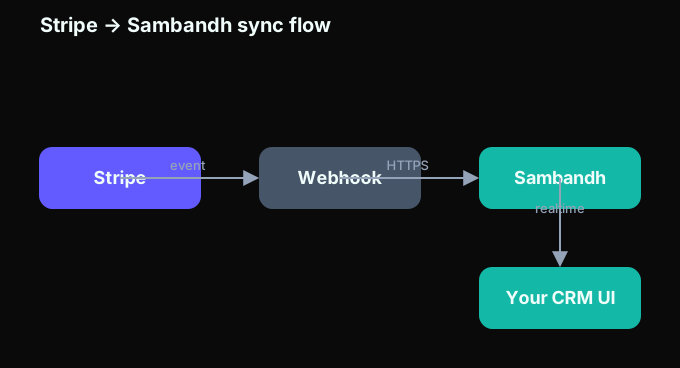
- On Stripe connection, the CRM imports every customer, subscription, invoice, and transaction.
- On every Stripe webhook event —
customer.subscription.created,updated,deleted,trial_will_end,invoice.payment_failed, and so on — the CRM updates its local copy within seconds. - When you ask "what's my MRR?", the CRM computes it from live data: sum of (subscription_price × monthly_frequency_factor) over every subscription with
status = activeright now.
This is what Sambandh does, and it's why the Stripe CRM guide describes MRR as a first-class field, not a custom property. It's also why Sambandh's Stripe integration is a native module, not a marketplace plugin.
Why Zapier is the wrong tool for this
Zapier is a great tool. It's the wrong tool for keeping MRR in sync for three reasons:
1. It batches
Zapier's free tier polls every 15 minutes. Paid tiers poll every 1–2 minutes. For a CRM that drives operational workflows — "customer just churned, send a win-back email" — minutes of lag is too much. By the time Zapier runs, the customer has already told their team. Webhook-driven sync, by contrast, updates the CRM within 1–3 seconds of the Stripe event.
2. It has no idempotency guarantees
If a Zap fires twice for the same event (which happens), you get duplicate records or double-counted values. A native integration handles idempotency at the Stripe event-id level — the same event, processed twice, produces the same final state.
3. It breaks silently
Zaps fail. Zapier emails you when they do, but usually the email arrives a week later. A native integration has a monitored webhook endpoint, retry logic, and a visible "last synced" timestamp in the UI.
For the kinds of sales-ops automation Zapier was designed for — creating a Google Sheet row when a form is submitted — these aren't problems. For keeping your CRM's MRR accurate, they are fatal.
What "first-class MRR" looks like in practice
When MRR is native to the CRM, certain queries become trivial that were previously impossible:
- Filter customers by MRR band: "show me everyone paying between $50 and $500/month who upgraded in the last 90 days."
- Segment churn by cohort: "what's the churn rate for customers who signed up in January vs July, net of upgrades?"
- Pipeline stages driven by billing events: move a deal to "at risk" when
invoice.payment_failedfires twice in a row. - Revenue-aware campaigns: trigger a drip sequence to every customer on the Pro plan whose card expires in 14 days.
None of these require you to sync anything to anywhere. They're just filters on a data model where Stripe IS the data model. See the sales pipeline guide for more on designing subscription pipelines.
Handling the edge cases
Real Stripe data is messy. A correct MRR calculation has to handle:
- Annual plans: divide by 12.
- Quarterly plans: divide by 3.
- Custom billing cycles (e.g., every 6 weeks): normalize to a monthly factor.
- Trial subscriptions: exclude from MRR until the trial converts.
- Paused subscriptions: exclude (or show as "paused MRR" separately).
- Stripe Connect: scope MRR to the platform account, the connected account, or both.
- Tax-inclusive plans: subtract tax if you use Stripe Tax and want net MRR.
- Mid-cycle upgrades/downgrades: prorate or don't, depending on your reporting convention.
- Refunds issued in the current period: subtract from current MRR or don't, depending on convention.
A Stripe-native CRM handles these correctly out of the box. A Zapier zap does not.
What about Paddle, LemonSqueezy, and Polar?
If your billing stack is Paddle, LemonSqueezy, Polar, or Chargebee instead of (or alongside) Stripe, the same principles apply. Every serious billing provider emits webhooks for subscription lifecycle events. Sambandh treats each provider as equally first-class — see the Paddle CRM, LemonSqueezy CRM, and Polar CRM landing pages for the provider-specific setup.
The worst case is running two or more providers simultaneously (common for teams using Paddle for EU VAT and Stripe elsewhere). A Stripe-only CRM silently misses the Paddle half of your revenue. Sambandh reports combined MRR across every connected provider, with the ability to segment or compare per-provider.
Migration: what to do if your MRR is currently in HubSpot or a spreadsheet
If you're currently tracking MRR in HubSpot, Pipedrive, a Google Sheet, or Airtable, the migration is usually easier than you expect:
- Export current MRR snapshot (just in case you want to verify parity).
- Connect Stripe to Sambandh — takes about 60 seconds.
- Let the initial backfill complete — usually 5–15 minutes for up to ~10k customers.
- Compare totals: the Sambandh MRR number should match your Stripe dashboard's "gross recurring volume" for the current month, ±1% for timing edge cases.
- Decommission the old sync — delete the Zap, the spreadsheet, or the manual process.
See the CRM migration guide for the full walk-through. MoveTo handles the CRM side of the migration in parallel.
Frequently Asked Questions
How real-time is "real-time" MRR in Sambandh?
Webhook-driven updates typically appear in the CRM within 1–3 seconds of the Stripe event. For practical purposes, this is indistinguishable from true real-time — faster than any human or Zapier zap can react.
Does Sambandh double-count if Stripe sends a webhook twice?
No. Every Stripe event has a unique id field, and Sambandh deduplicates on that ID before applying the event to local state. Retries from Stripe — which happen for events Stripe isn't sure you received — are harmless.
Can I see historical MRR in a chart?
Yes. Sambandh stores every subscription state change, so you can plot MRR over time, segment by plan/cohort, and compare periods. The data is native — no extra reporting tool needed.
What if my Stripe account uses a different currency?
Sambandh normalizes MRR to a single display currency (default: USD) using Stripe's exchange rates at the time of each transaction. You can switch the display currency at any time without re-importing.
Does this work if I also use Paddle or LemonSqueezy?
Yes. Connect multiple billing providers and Sambandh will sum MRR across all of them. See Paddle CRM and LemonSqueezy CRM for provider-specific details.
How does this compare to ProfitWell, ChartMogul, or Baremetrics?
Those are dedicated MRR analytics tools — they're good at charts and cohort analysis. Sambandh is a CRM with MRR as a first-class field, which means you can also act on MRR (trigger emails, move pipeline stages, segment contacts) inside the same tool. Many teams use both: a dedicated analytics tool for board reporting, and Sambandh for day-to-day operations.
Want to see Sambandh's live Stripe MRR for yourself? Start a free trial — the free plan supports up to 50 contacts and is free forever. Connect Stripe in 60 seconds and see your real MRR inside the CRM in minutes.
Related reading
Ready to try a CRM built for how you actually work?
Start Free Trial